
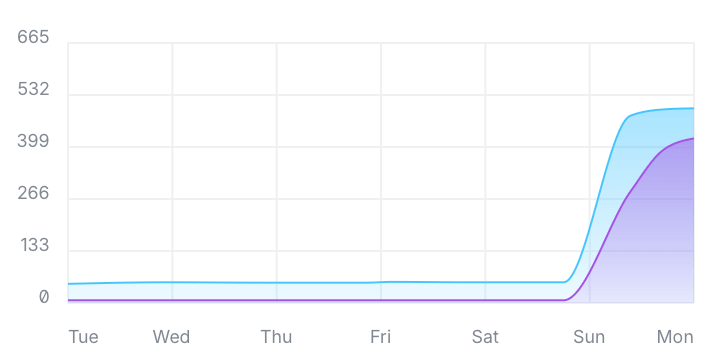
This past weekend I made one one of the biggest upgrades to our home internet capability ever, so consider this article a brief PSA about regularly auditing your home (or business) Internet speed and a possible quick (and inexpensive) fix if you find it lacking.
Brief ISP Backstory
The poor state of Internet connectivity in America is nothing new to write about. Limitations on which ISPs serve which areas and the active colluding by ISPs to not compete with each other is part of the reality for most Americans looking at high-speed internet access.
When Google Fiber came to Louisville several years ago I was hopeful that this would change for us. Our home is currently only served by a single cable internet provider or a couple of DSL providers. There is no fiber access in my neighborhood at all. Google Fiber left Louisville when they attempted a new style of burying fiber (only a few inches below ground) ran into major issues with the fiber “unburying” itself as the weather shifted between summer heat and winter freezes.
So, my area was still left without anything aside from a single cable internet provider and the DSL providers.
It wouldn’t have been so bad, but our cable Internet plan was limited to 50 Mb down, and 5 Mb up. While this was great in the early 2010s when we moved into our house, it was definitely stressed by the pandemic, when teaching moved online and it wasn’t uncommon for both my wife and I to be teaching online at the same time. In an attempt to cope with the online demands at the time, I upgraded our entire home network, but the ISP speed was still a bottleneck.
Check Your Connection Speed
A little bit over a year ago, we got a notice in the mail that our Internet was speeding up. Instead of 50Mb/5Mb, the speed would jump up to 300Mb/30Mb. Naturally, this was a very welcome surprise, and I was looking forward to the increase. The flyer was noncommittal about when the speed bump would happen – promising it would be “over the next few months”. I made sure that all of our equipment could handle the greater speeds, and thought nothing more of it.
Until about a month ago, when I happened to look at my Unifi router’s dashboard. Back when I first heard about the speed increase, I had setup Unifi to run periodic speed checks on our network during the very early morning. I hadn’t checked on them in the past several weeks, and I was annoyed that the speed was showing slightly higher (55Mb/7Mb), but still nothing near the 300Mb we were promised.
I was gearing up to try and talk to Spectrum’s customer service, but before that, I started looking around on our ISP’s website. In looking around, I found that our current Internet package actually should be 400Mb down, and that the ISP has a special speed test, which can not only test the speed to your device (which is what other speed tests measure), but it can also show you the speed your cable modem is getting. This helps you diagnose issues like poor WiFi reception or other router issues – if your modem gets a high speed, but you’re only seeing a small percentage of that, then you can figure out where the actual issue is without needing to make a phone call to customer service or bring out a technician.
On running the ISP-level speed test, I was quite surprised to find that it was claiming 533Mb to the modem, but less than a tenth of that (50Mb) was getting to the device running the test. While I was connected via WiFi, and WiFi has natural limitations compared to a direct cable connection, our WiFi setup is quite robust, and this speed differential could not be explained by WiFi alone.
Since my modem was (apparently) getting 500+ Mb, and my WiFi router was delivering less than 10% of that speed, my only thought was that the issue must lie between the modem and the router. And the only thing between those two devices, was an ethernet cable.
Cable Matters
The ethernet cables between those two devices was Cat5e – certainly not the newest or fastest cable – but Cat5e has a maximum speed of 1 Gbps, or 1,000 Mbps over 100 meters. The cable from my modem to my router is on the order of 2 feet, and while longer runs can slow data speed, I’ve never heard of a cable topping out at 5% of it’s max speed over such a short length. In my (limited) experience, cable runs over that distance either work or they don’t, and this cable had been in place for years with no issues.
However, I found some inexpensive Cat 6 cables online, replaced the cable between my modem and router, and instantly got an almost 100x increase in internet speed.
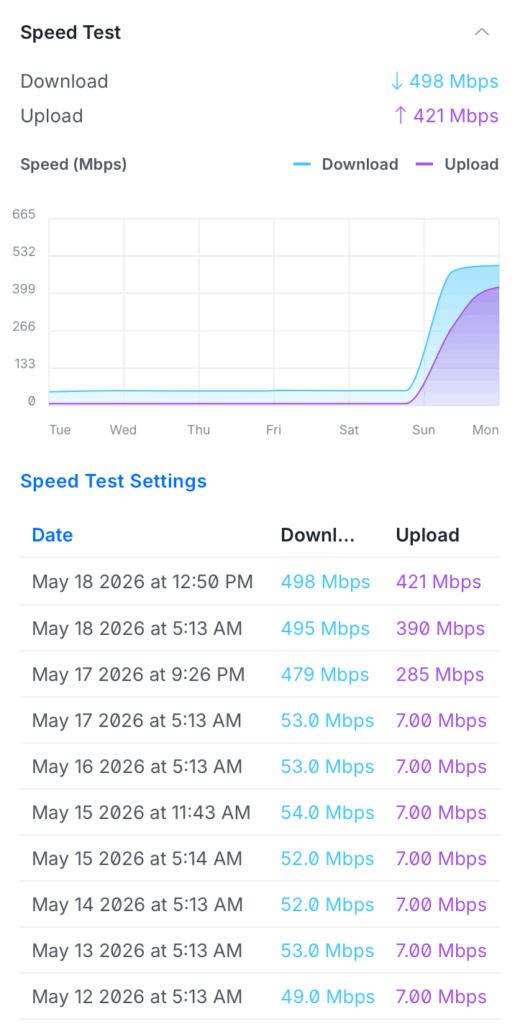
So, consider this a reminder to check in on your internet speed every 6 months or so, and compare that with what you’re paying for. And if you notice a big discrepancy, it may not be a fix that requires a lot of money or a service call to fix. Sometimes just a $5 cable can be all you need!

Leave a Reply
You must be logged in to post a comment.